
Job-Orientated Skill Training
Video Editing Course with AI in Siliguri
Learn Video Editing with AI in Siliguri through practical classroom training at Technoglobe Siliguri. Build hands-on skills in Adobe Premiere Pro, Adobe After Effects, Adobe Audition, motion graphics, sound design, colour grading, VFX and AI-generated content while completing real editing projects and developing your portfolio.
AI-Integrated Curriculum
Practical Projects
Industry Certification
Placement Assistance
Build Practical Video Editing Skills for the Real World
Video editing is more than cutting clips and adding transitions. It involves visual storytelling, sound design, motion graphics, colour correction and creative decision-making that transform raw footage into engaging videos.
At Technoglobe Siliguri, our 4-month Video Editing Course with AI is designed to take students from basic editing concepts to advanced post-production techniques through structured learning and practical project work.
Students learn Adobe Premiere Pro for video editing and post-production, Adobe Audition for audio editing and sound design, and Adobe After Effects for motion graphics and VFX. The course also introduces AI prompting, text-to-image generation, text-to-video generation, ChatGPT, Gemini and PixVerse.
Through practical assignments, students work towards creating short films, advertisements, music videos, podcasts, motion graphics and animated explainers. The programme concludes with final projects and mandatory portfolio development.
- Duration: 4 Months
- Practical Classroom Training
- AI Content Creation
- Professional Editing Techniques
- Practical Projects
- Industry-Relevant Tools
- Internship Assistance
- Placement Support
- Industry Certification
Download the Complete Course Syllabus & Book Your Free Demo Class
Get the complete Video Editing Course syllabus, including Adobe software modules, AI tools, practical projects and the recommended four-month training structure. Submit your details to learn more about upcoming batches and admission requirements.
*We respect your privacy. No spam. 100% free counselling and demo class support.
Need Quick Course Guidance?
Who Can Learn Video Editing?
Our Video Editing Course in Siliguri starts with foundational concepts and progresses towards professional editing techniques. It is suitable for beginners and individuals interested in video production, digital content creation, motion graphics and AI-assisted creativity.

School & College Students
Learn video editing fundamentals, professional software and creative production techniques while exploring potential career paths in digital media.

Graduates & Freshers
Build practical editing, audio production and motion graphics skills through structured training and portfolio projects.

Working Professionals
Develop video editing and content production skills that can support marketing, presentations, communications and creative projects.

Aspiring & Current Content Creators
Improve your ability to create YouTube videos, Instagram Reels, short films and engaging visual content using professional editing techniques.

Aspiring Future Freelancers
Learn editing, sound design, colour grading and motion graphics while developing project samples that demonstrate your abilities to potential clients.
New to Video Editing?
Start with the fundamentals, learn how to edit videos and audio using Adobe Premiere Pro and Adobe Audition, and gradually progress towards motion graphics, visual effects and AI-assisted content creation.
What Will You Learn in the Video Editing Course?
-
Adobe Premiere Pro: Video Editing & Post-Production 01
Learn professional video editing with Adobe Premiere Pro, including project setup, timeline editing, cutting, trimming, transitions, titles, captions, audio synchronization, color correction and grading, multicamera editing, masking, stabilization, and video exporting. Apply your skills by creating a short film, advertisement or music video.
-
Adobe After Effects: Motion Graphics & VFX 02
Explore motion graphics and visual effects using Adobe After Effects, including keyframe animation, kinetic typography, motion tracking, masking, green-screen compositing, rotoscoping, 3D layers, camera effects and rendering. Develop a motion graphics video or animated explainer as a practical project.
-
Adobe Audition: Audio Editing & Sound Design 03
Learn professional audio editing with Adobe Audition, including voice recording, waveform editing, noise reduction, multitrack editing, equalisation, compression, audio mixing, mastering and synchronising sound with video. Create a podcast or voiceover project with background music and sound effects.
-
Artificial Intelligence: AI Content Creation 04
Explore AI prompting, text-to-image generation and text-to-video generation using tools such as ChatGPT, Google Gemini and PixVerse. Learn to develop creative ideas, generate visual concepts, write content and experiment with AI-assisted video production workflows.
Video Editing Tools You Will Work With
The course focuses on three professional Adobe applications and selected AI tools. Students learn video editing and post-production with Adobe Premiere Pro, audio editing and sound design with Adobe Audition, and motion graphics and VFX with Adobe After Effects.
The AI modules introduce ChatGPT, Gemini and PixVerse for creative ideation, content generation and visual experimentation.
Adobe Premiere Pro | Adobe After Effects | Adobe Audition | Adobe Media Encoder | ChatGPT | Google Gemini | PixVerse + Many More Tools Covered
Learn how Premiere Pro supports professional video editing, After Effects enables animation and visual effects, and Audition helps produce cleaner, better-balanced audio. Explore how AI tools can assist with creative concepts, image generation, video generation and content planning.
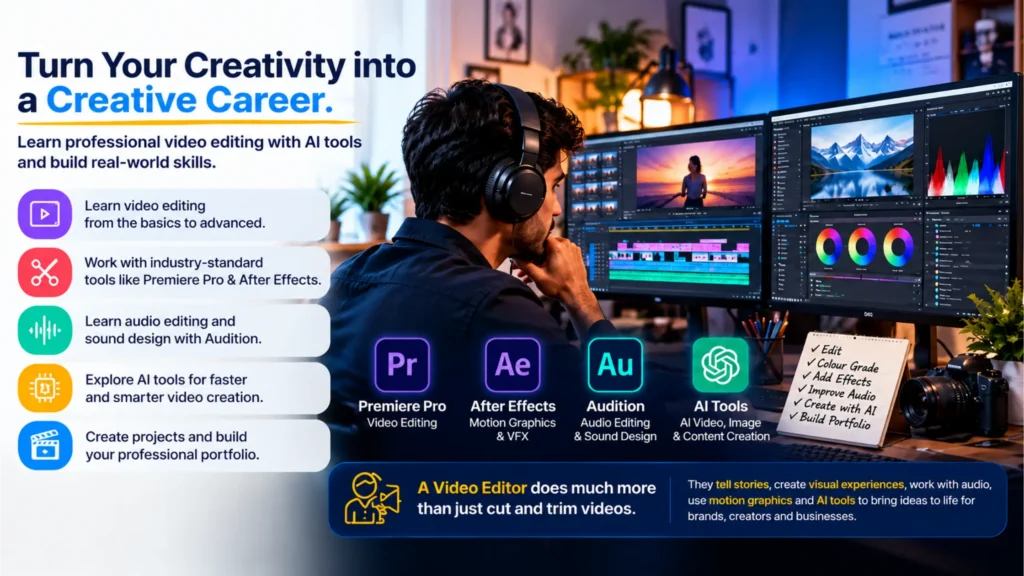
Learn Video Editing, Motion Graphics, audio, and AI tools together to turn your creativities into a real career.
How Is AI Integrated into Video Editing Learning?
Artificial Intelligence is becoming part of modern creative workflows, helping editors and content creators develop ideas, generate visual assets and experiment with new production techniques.
At Technoglobe Siliguri, the Video Editing Course includes a dedicated 7-module AI component covering AI fundamentals, prompting, image generation, video generation, ChatGPT, Gemini and PixVerse.
Learn by Creating, Not Just Watching

Learn
Understand the fundamentals of video editing, audio production, motion graphics and AI tools through practical classroom training.

Edit
Work with Adobe Premiere Pro and Audition to edit footage, improve sound, apply transitions and colour correction.

Create
Use Adobe After Effects and AI tools to develop motion graphics, visual effects and AI-generated content.

Showcase
Complete video, audio and motion graphics projects and organise your best work into a professional portfolio.
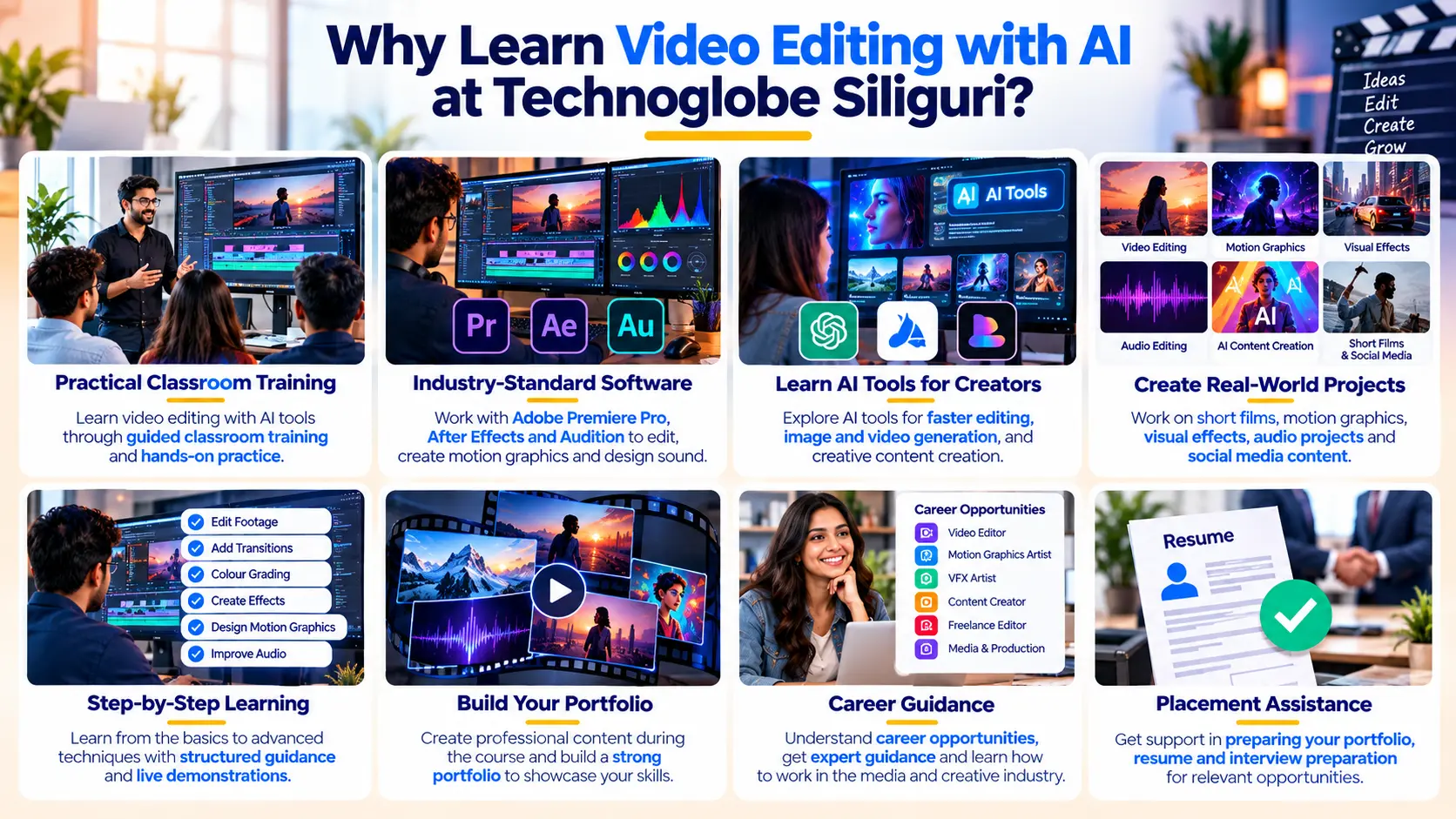
Once you submit your enquiry, our team will guide you with Video Editing course details, fees, batch timing, syllabus, tools covered and free demo class availability.
Why Choose This Course?
Practical Hands-on Training
Learn editing, audio production and motion graphics through guided classroom demonstrations and hands-on exercises.
AI-Integrated Learning
Explore AI prompting, text-to-image generation, text-to-video generation and creative AI Tools with other software.
Project-Based Training
Complete practical projects in Adobe Audition, Premiere Pro and After Effects to apply concepts learned during training.
Pro-Industry Softwares
Work with Adobe Premiere Pro, Adobe Audition and Adobe After Effects, covering the major post-production areas.
Experienced Faculty
Learn with guidance from a trainer specialising in Video Editing, Motion Graphics, Visual Effects and Post-Production.
Portfolio Development
Build a portfolio using video editing, audio production and motion graphics projects, as required by the syllabus.
From Raw Footage to Final Output: Learn to Think Like a Video Editing Professional

Organise
Learn project setup, media management, sequence creation and timeline organisation to prepare footage for editing.
Edit
Use cuts, trims, ripple edits, slip edits, slide edits, speed controls and transitions to assemble video sequences.
Enhance
Apply Lumetri colour correction, LUTs, titles, captions, masking and stabilisation to improve the visual presentation.
Design Sound
Work with audio cleanup, EQ, compression, multitrack mixing, synchronisation and mastering to improve audio quality.

Animate & Composite
Create motion graphics, kinetic typography, tracked elements, green-screen composites and 3D layer effects.

Export & Present
Prepare final videos using appropriate codecs, formats, compression and rendering settings, then organise projects into a portfolio.
The course introduces students to the different stages of professional post-production, from organising footage and editing timelines to sound design, colour correction, animation, visual effects and final rendering.
Skills in video editing, audio production, motion graphics and VFX are relevant to digital media, advertising, content production, entertainment and online communication.
By developing a practical portfolio using Premiere Pro, Audition and After Effects, students can begin exploring different creative roles. Actual career opportunities depend on portfolio quality, practical skills, experience and employer requirements.
- Video Editor
- Junior Video Editor
- Assistant Video Editor
- Social Media Video Editor
- YouTube Video Editor
- Video Post-Production Assistant
- Audio Editing Assistant
- Sound Editing Assistant
- Motion Graphics Assistant
- VFX Assistant
- Freelance Video Editor
- Digital Content Editor
The syllabus includes final projects in audio editing, video post-production and motion graphics, providing opportunities to create work samples for portfolio presentation.
Placement assistance is available, but employment or specific earnings are not guaranteed.
What Our Students Say
Posted on Google
 AyushRai .1
Trustindex verifies that the original source of the review is Google.
I’m really happy I joined this course. The combination of AI with Advanced digital marketing & Brand promotion is very useful for today’s market. Technoglobe Siliguri is best institutes to learn Advanced AI in Digital Marketing. The course is practical, and they guide you on real projects and brand promotion strategies. Great support from trainers and team.Posted on Google Rita RoyBest institute in Siliguri for Accounting & GST training. The trainer explains Tally, GST and taxation concepts in a very simple way. Highly satisfied with the course structure and guidance.Posted on Google
 Raj ChowdharyI have enrolled in a Digital Marketing certification program and am currently working on live projects related to ongoing campaigns. I’m truly enjoying the learning experience and hands-on exposure.Posted on Google
 Akhilesh RayI joined the Full Stack Developer Trainee program at Technoglobe Siliguri and learning strong practical exposure to JavaScript (ES6+), ReactJS, Node.js, Express.js, and MongoDB. The course included REST APIs, authentication, Git, and real-time project development. The hands-on training and industry-focused approach helping me build solid full-stack development skills.A highly professional environment for serious developers.Definitely worth joining.Posted on Google
 Nischal KumarThe best part about learning at Technoglobe Siliguri is that all courses are updated with the latest AI-based tools and technologies. The trainers focus strongly on practical, hands-on training, which makes learning easy and effective. The lab is equipped with advanced software and modern systems, and the environment is calm, clean, and very comfortable for studying. It truly offers a high standard of education. Highly recommended!👍👌✨️✨️✨️Posted on Google
 Moumita Roy GuptaAs a working professional, the AI Accounting Professional GST course at Technoglobe Siliguri has been very beneficial for improving my practical GST and accounting knowledge. The flexible batch timings are perfect for working professionals, and the AI-based, hands-on training makes learning industry-focused and easy.A great choice for working professionals.👍✨️👍👍Posted on Google
 PRANEET UPADHYAI joined the Digital Marketing course at Technoglobe Siliguri and gained practical exposure to AI-powered marketing strategies and tools like Google Analytics, Google Ads, Meta Ads Manager, Canva, and ChatGPT. The course covers SEO, social media marketing, content creation, and performance tracking through live projects. The trainers are experts in their field and focus on hands-on, industry-oriented teaching, which makes learning highly effective. A perfect platform for professional upskilling.👍👍Posted on Google
 Nazma ParveenAs a real estate sales professional, joining the Digital Marketing course at Technoglobe Siliguri has been a game changer for my career.The AI-based training and practical approach helped me understand online lead generation, social media promotions, and digital branding, which are directly improving my sales performance. The trainers focus on real-world applications, and the advanced lab facilities provide an excellent learning environment. Highly recommended !! *✨✨Posted on Google
 Tinku SinghI joined the Digital Marketing course at Technoglobe Siliguri and learning practical skills like social media marketing, SEO, and ads management. The training is very practical and career-focused. The faculty is supportive and always ready to guide students. Highly recommended!
Share your review and help students in Siliguri choose the right career training institute.

Interested in the Course? Here Is What Happens Next
No pressure. Understand the course, experience the training and then decide if it is right for you.
Send Your Enquiry
Fill in the enquiry form, call us or message us on WhatsApp.
Talk to Our Counsellor
Tell us about your background, career goals and what you want to learn.
Understand the Course
Get clear information about the syllabus, fees, batches, training and career opportunities.
Attend a Free Demo
Experience the classroom, meet the trainer and understand how the course is taught before you decide.
Ready to Explore the Course?
Book your free demo class and experience the training before making your decision.
Interested in the Course? Here Is What Happens Next
No pressure. Understand the course, experience the training and then decide if it is right for you.
Send Your Enquiry
Fill in the enquiry form, call us or message us on WhatsApp.
Talk to Our Counsellor
Tell us about your background, career goals and what you want to learn.
Understand the Course
Get clear information about the syllabus, fees, batches, training and career opportunities.
Attend a Free Demo
Experience the classroom, meet the trainer and understand how the course is taught before you decide.
Ready to Explore the Course?
Book your free demo class and experience the training before making your decision.
BOOK FREE DEMO CHAT ON WHATSAPPFind answers to common questions about our Video Editing Course with AI in Siliguri, including software, course modules, AI training, practical projects, eligibility and career opportunities.
What is the duration of the Video Editing Course at Technoglobe Siliguri?
The official syllabus recommends a 4-month Video Editing Course structure. The first month focuses on fundamentals, the second on intermediate skills, the third on advanced and creative techniques, and the fourth on revision, final projects and portfolio development.
Can beginners join the Video Editing Course?
Yes. The syllabus begins with introductory modules covering software interfaces, workspaces, editing tools and foundational concepts, making it suitable for beginners who want to learn video editing.
Which software will I learn during the course?
The syllabus covers Adobe Premiere Pro for video editing, Adobe Audition for audio editing and sound design, and Adobe After Effects for motion graphics and VFX. Adobe Media Encoder is also introduced in the rendering workflow.
Does the course include Artificial Intelligence?
Yes. The syllabus includes seven dedicated AI modules covering AI introduction, prompting, text-to-image generation, text-to-video generation, ChatGPT, Gemini and PixVerse.
What will I learn in Adobe Premiere Pro?
Students learn project setup, timeline editing, transitions, effects, titles, captions, audio editing, colour grading, multicamera editing, masking, stabilisation and exporting.
hat will I learn in Adobe Audition?
The Adobe Audition syllabus covers audio recording, waveform editing, noise reduction, multitrack sessions, EQ, compression, mixing, mastering and audio synchronisation.
Does the course cover Adobe After Effects?
Yes. Students learn After Effects compositions, layers, keyframes, animation, kinetic typography, motion tracking, masking, green-screen compositing, 3D layers and rendering.
Will I learn colour correction and colour grading?
Yes. The Premiere Pro syllabus includes Lumetri colour correction, exposure, contrast, LUTs and look creation.
Will I learn motion graphics and VFX?
Yes. The After Effects modules include text animation, motion paths, masking, motion tracking, visual effects, rotoscoping, green-screen compositing and 3D layers.
Can I learn to edit YouTube videos and Instagram Reels?
The syllabus prepares students to edit different video formats and specifically identifies Reels, YouTube videos, advertisements, music videos and short films among its intended project outcomes.
Does the course include AI image and video generation?
Yes. Students explore AI text-to-image generation and text-to-video generation, including realistic, digital art and anime-style outputs.
What practical projects are included?
The syllabus specifies three final software projects: a podcast or voiceover with music and mastering, a short film, advertisement or music video, and a motion graphics video or animated explainer.
Will I develop a video editing portfolio?
Yes. Portfolio development is mandatory in the official syllabus. Students are expected to organise completed work demonstrating video editing, audio production and motion graphics skills.
What are the fees for the Video Editing Course in Siliguri?
The uploaded syllabus does not specify course fees. Contact the Technoglobe Siliguri academic counselling team for current fees, payment options and upcoming batch details.
Does Technoglobe Siliguri provide placement assistance?
Placement assistance and career preparation support are part of the institute’s advertised training offering. Employment depends on individual skills, interviews and employer requirements.
Is a free demo class available?
You can request a free demo class through the course enquiry form or by contacting the Technoglobe Siliguri counselling team, subject to scheduling availability.
What career opportunities can I explore after completing the course?
Ready to Start Learning Video Editing?
Visit Technoglobe Siliguri, explore the course, meet the trainer and attend a free demo class before deciding.
BOOK YOUR FREE DEMO CLASS
Call: +91 70637 70017
WhatsApp: +91 70637 70074
City Centre, Siliguri