
Job-Orientated Skill Training
Hardware & Networking Course in Siliguri
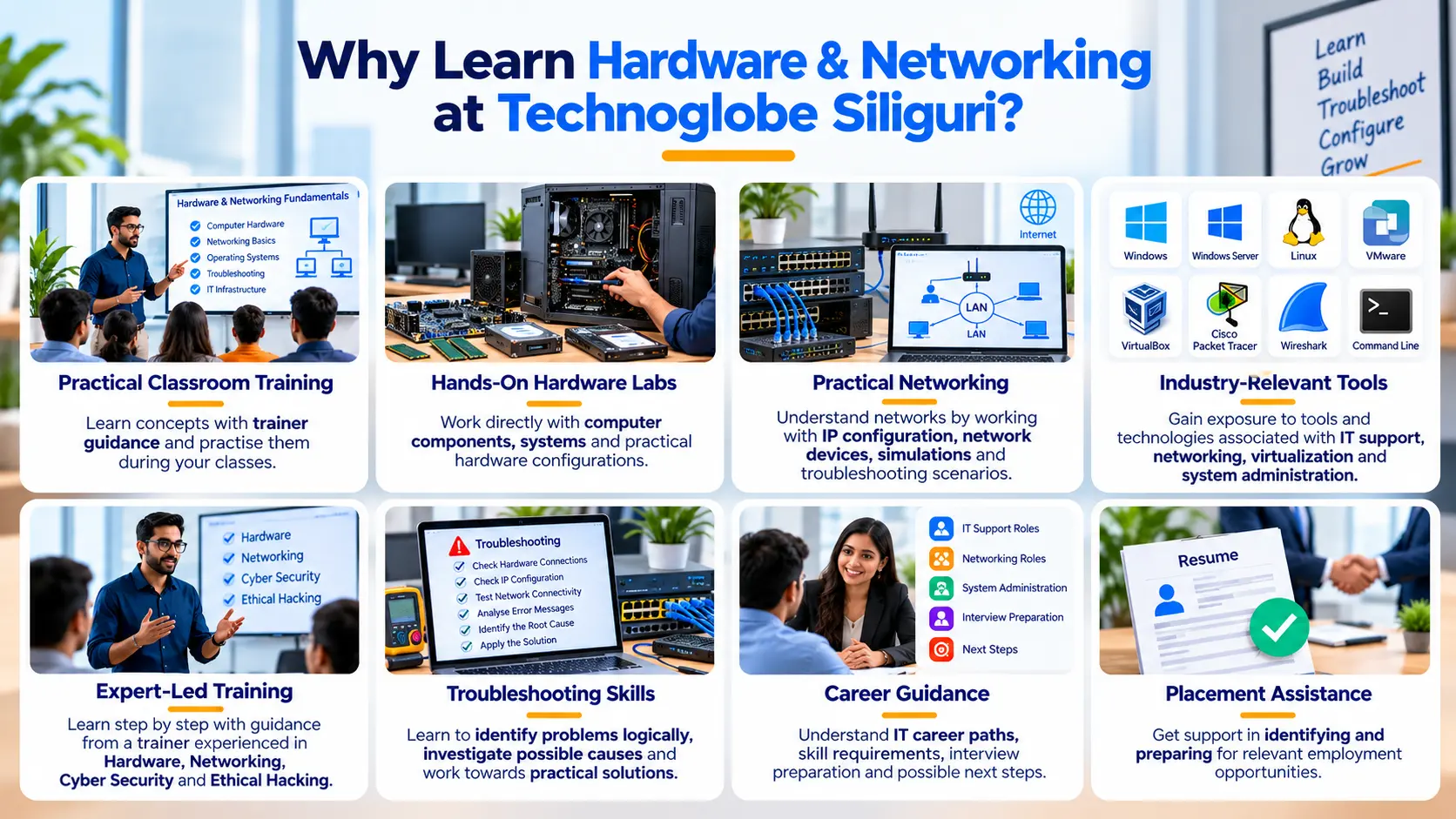
Build practical skills in computer hardware, networking, troubleshooting, system administration and IT infrastructure through hands-on classroom training at Technoglobe Siliguri. Learn to work with computer components, operating systems, networks, Windows Server, Linux, virtualization and network troubleshooting tools while developing skills for modern IT support roles.
Hands-On Practical Labs
Hardware & Network Troubleshooting
Industry Certification
Placement Assistance
Build Practical Hardware & Networking Skills for the Real World
Knowing the names of computer components is not enough to work in IT support, hardware or networking. You need to understand how systems actually work, how devices communicate and what to do when something goes wrong.
The Hardware & Networking Course at Technoglobe Siliguri focuses on developing practical skills through hands-on classroom training, lab exercises and troubleshooting scenarios.
You will learn how computer hardware works, how operating systems are installed and configured, how networks are built, how devices communicate through a network and how common hardware and connectivity problems are diagnosed.
As you progress, you will work with concepts and technologies related to Windows, Linux, IP addressing, routers, switches, Windows Server, virtualization and network troubleshooting.
The objective is simple: do not just identify the problem. Learn how to understand it, troubleshoot it and solve it.
- Duration: 6 Months
- Practical Classroom Training
- Hands-On Hardware Labs
- Networking Fundamentals
- System Troubleshooting
- Industry-Relevant Tools
- Placement Support
- Industry Certification
Download the Complete Course Syllabus & Book Your Free Demo Class
Fill in your details to receive the complete Hardware & Networking course syllabus and get information about fees, batch timings, practical training, career opportunities and your free demo class.
*We respect your privacy. No spam. 100% free counselling and demo class support.
Need Quick Course Guidance?
Who Can Learn Hardware & Networking?
You do not need to already be an IT expert. The course is designed to help learners understand computer hardware and networking from the fundamentals before progressing towards practical configuration and troubleshooting.

Students
Develop practical computer hardware and networking skills alongside your academic studies and gain exposure to real IT infrastructure concepts.

Graduates & Freshers
Build practical IT skills that can support your preparation for technical support, networking and system administration roles.

Working Professionals
Develop or strengthen your understanding of computer systems, networks, operating systems and IT infrastructure for career development or transition.

After Classes 10th or 12th
Students interested in computers and IT can begin developing hardware, networking and troubleshooting skills for further learning and entry-level opportunities.
IT Career Aspirants
Build a foundation in hardware, networking, operating systems and troubleshooting before progressing towards more specialised areas of IT.
New to Hardware & Networking?
That is fine. You begin with the fundamentals and gradually progress towards hands-on hardware, network configuration, system administration and troubleshooting.
What Will You Learn in the Hardware & Networking Course?
-
Computer Hardware Fundamentals 01
Understand the major components of a computer, including motherboard, processor, RAM, storage devices, power supply, peripherals and other internal components.
-
Computer Assembly & Configuration 02
Learn how computer components fit together and understand the practical process of assembling, upgrading and configuring computer systems.
-
Operating System Installation 03
Learn how to install, configure and manage operating systems, drivers, partitions, user accounts and essential system settings.
-
Hardware Troubleshooting 04
Understand how to diagnose common problems related to booting, storage, memory, peripherals, operating systems and computer performance.
-
Networking Fundamentals 05
Learn how computer networks work and understand concepts such as LAN, WAN, network topologies, protocols and network communication.
-
IP Addressing & Subnetting 06
Understand IPv4 addressing, subnet masks, default gateways, private and public IP addresses and the fundamentals of subnetting.
-
Routers, Switches & Network Devices 07
Understand the roles of routers, switches, access points and other networking devices and how they connect systems within a network.
-
Network Configuration 08
Learn practical concepts related to network connectivity, IP configuration, DHCP, DNS and basic network setup.
-
Windows Administration 09
Develop practical understanding of Windows configuration, user management, permissions, system settings and troubleshooting.
-
Windows Server Fundamentals 10
Learn fundamental concepts related to Windows Server, users, groups, domains, Active Directory and network administration.
-
Linux Fundamentals 11
Understand the basics of Linux installation, file systems, commands, users, permissions and system administration.
-
Virtualization 12
Learn how virtual machines are created and managed using technologies such as VMware Workstation and VirtualBox.
-
Network Troubleshooting 13
Learn how to identify and diagnose connectivity problems using network commands, logical troubleshooting and packet analysis tools.
-
IT Support & System Maintenance 14
Understand common IT support workflows including system maintenance, software installation, updates, backups, troubleshooting and user support.
-
Introduction to Network Security 15
Understand basic concepts related to secure networks, access control, passwords, firewalls and common network security practices.
Hardware & Networking Tools You Will Work With
Learning Hardware & Networking requires more than theory. During your training, you will work with operating systems, virtualization platforms, network simulators and troubleshooting tools to understand how IT infrastructure behaves in practical environments.
Tools Covered
Windows | Windows Server | Linux | VMware Workstation | VirtualBox | Cisco Packet Tracer | GNS3 | Wireshark | Command Prompt | PowerShell + Many More Tools Covered
Hardware & Networking Is More Than Fixing Computers
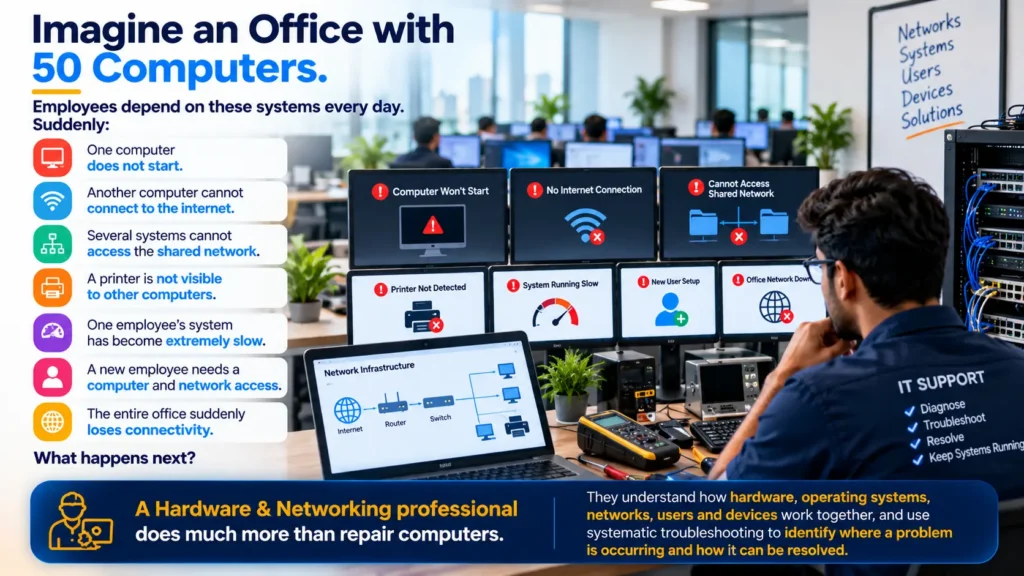
Hardware + Operating Systems + Networking + Troubleshooting = Reliable IT Infrastructure
How Is AI Integrated into Modern IT Learning?
AI is increasingly becoming a useful assistant for technical research, documentation and troubleshooting, but it does not replace the need to understand how hardware and networks actually work.
During training, students can learn how modern AI tools may assist with understanding error messages, researching technical problems, explaining commands, documenting troubleshooting steps and exploring possible solutions.
But there is an important difference between getting an AI-generated answer and knowing whether that answer is correct.
That is why the focus remains on understanding hardware, operating systems, networks and troubleshooting fundamentals first, and then learning how AI can support the technical workflow.
Learn the technology first. Then use AI to work with it more effectively.
Learn by Troubleshooting, Not Just Watching

Learn
Understand how the hardware, operating system or network is supposed to work.

Configure
Install, connect and configure systems, operating systems and network settings.
Troubleshoot
Identify what is not working and systematically narrow down the possible cause.

Solve
Apply the appropriate solution, test the system and confirm that the problem has actually been resolved.
Once you submit your enquiry, our team will guide you with Hardware Networking course details, fees, batch timing, syllabus, tools covered and free demo class availability.
Why Choose This Course?
Hands-On Labs
Develop skills through practical hardware, operating system and networking exercises.
Practical Learning
Move beyond definitions and understand how systems actually work.
Industry Tools
Work with operating systems, virtualization platforms, network simulators and troubleshooting tools.
Troubleshooting Approach
Learn to approach technical problems through observation, diagnosis, testing and resolution.
Expert Faculty
Learn directly from a trainer actively working across Digital Marketing, SEO, websites, advertising and AI.
Career-Focused Skills
Build a practical foundation for opportunities across hardware & networking
From Problem to Solution: Learn to Think Like IT Support

Identify the Problem
Understand what is actually not working instead of immediately changing settings.

Gather Information
Observe symptoms, error messages, system behaviour and what changed before the problem occurred.
Check the Basics
Inspect hardware connections, configuration, network settings and system status.

Narrow Down the Cause
Use logical troubleshooting to determine whether the problem relates to hardware, software, configuration or connectivity.

Apply the Solution
Take the appropriate corrective action and avoid unnecessary changes.
Test & Document
Confirm that the system works correctly and record what caused the problem and how it was resolved.
Good troubleshooting is not guessing until something works. It is understanding the system well enough to identify why it stopped working.
Hardware & Networking skills can support several entry-level and developing career paths across IT support, computer hardware, networking and system administration.
As you gain experience and additional certifications, you can continue developing towards more specialised areas such as network administration, server administration, cloud infrastructure and cyber security.
- IT Support Technician
- Desktop Support Technician
- Hardware Technician
- Technical Support Executive
- Network Support Technician
- Network Support Engineer
- IT Helpdesk Executive
- System Support Executive
- Junior Network Administrator
- Junior System Administrator
- Field Support Technician
- IT Infrastructure Support
Career opportunities depend on your qualifications, technical skills, practical experience, certifications, interview performance and individual employer requirements.
What Our Students Say
Posted on Google
 AyushRai .1
Trustindex verifies that the original source of the review is Google.
I’m really happy I joined this course. The combination of AI with Advanced digital marketing & Brand promotion is very useful for today’s market. Technoglobe Siliguri is best institutes to learn Advanced AI in Digital Marketing. The course is practical, and they guide you on real projects and brand promotion strategies. Great support from trainers and team.Posted on Google Rita RoyBest institute in Siliguri for Accounting & GST training. The trainer explains Tally, GST and taxation concepts in a very simple way. Highly satisfied with the course structure and guidance.Posted on Google
 Raj ChowdharyI have enrolled in a Digital Marketing certification program and am currently working on live projects related to ongoing campaigns. I’m truly enjoying the learning experience and hands-on exposure.Posted on Google
 Akhilesh RayI joined the Full Stack Developer Trainee program at Technoglobe Siliguri and learning strong practical exposure to JavaScript (ES6+), ReactJS, Node.js, Express.js, and MongoDB. The course included REST APIs, authentication, Git, and real-time project development. The hands-on training and industry-focused approach helping me build solid full-stack development skills.A highly professional environment for serious developers.Definitely worth joining.Posted on Google
 Nischal KumarThe best part about learning at Technoglobe Siliguri is that all courses are updated with the latest AI-based tools and technologies. The trainers focus strongly on practical, hands-on training, which makes learning easy and effective. The lab is equipped with advanced software and modern systems, and the environment is calm, clean, and very comfortable for studying. It truly offers a high standard of education. Highly recommended!👍👌✨️✨️✨️Posted on Google
 Moumita Roy GuptaAs a working professional, the AI Accounting Professional GST course at Technoglobe Siliguri has been very beneficial for improving my practical GST and accounting knowledge. The flexible batch timings are perfect for working professionals, and the AI-based, hands-on training makes learning industry-focused and easy.A great choice for working professionals.👍✨️👍👍Posted on Google
 PRANEET UPADHYAI joined the Digital Marketing course at Technoglobe Siliguri and gained practical exposure to AI-powered marketing strategies and tools like Google Analytics, Google Ads, Meta Ads Manager, Canva, and ChatGPT. The course covers SEO, social media marketing, content creation, and performance tracking through live projects. The trainers are experts in their field and focus on hands-on, industry-oriented teaching, which makes learning highly effective. A perfect platform for professional upskilling.👍👍Posted on Google
 Nazma ParveenAs a real estate sales professional, joining the Digital Marketing course at Technoglobe Siliguri has been a game changer for my career.The AI-based training and practical approach helped me understand online lead generation, social media promotions, and digital branding, which are directly improving my sales performance. The trainers focus on real-world applications, and the advanced lab facilities provide an excellent learning environment. Highly recommended !! *✨✨Posted on Google
 Tinku SinghI joined the Digital Marketing course at Technoglobe Siliguri and learning practical skills like social media marketing, SEO, and ads management. The training is very practical and career-focused. The faculty is supportive and always ready to guide students. Highly recommended!
Share your review and help students in Siliguri choose the right career training institute.

Interested in the Course? Here Is What Happens Next
No pressure. Understand the course, experience the training and then decide if it is right for you.
Send Your Enquiry
Fill in the enquiry form, call us or message us on WhatsApp.
Talk to Our Counsellor
Tell us about your background, career goals and what you want to learn.
Understand the Course
Get clear information about the syllabus, fees, batches, training and career opportunities.
Attend a Free Demo
Experience the classroom, meet the trainer and understand how the course is taught before you decide.
Ready to Explore the Course?
Book your free demo class and experience the training before making your decision.
Interested in the Course? Here Is What Happens Next
No pressure. Understand the course, experience the training and then decide if it is right for you.
Send Your Enquiry
Fill in the enquiry form, call us or message us on WhatsApp.
Talk to Our Counsellor
Tell us about your background, career goals and what you want to learn.
Understand the Course
Get clear information about the syllabus, fees, batches, training and career opportunities.
Attend a Free Demo
Experience the classroom, meet the trainer and understand how the course is taught before you decide.
Ready to Explore the Course?
Book your free demo class and experience the training before making your decision.
BOOK FREE DEMO CHAT ON WHATSAPPFind answers about free demo classes, course counselling, fees, batch timing, location, WhatsApp support and visiting Technoglobe Siliguri.
What is Hardware & Networking?
Hardware refers to the physical components of computer systems, while networking involves connecting computers and other devices so they can communicate and share resources. Together, these skills form an important foundation for IT support and infrastructure.
Who can join the Hardware & Networking Course at Technoglobe Siliguri?
The course is suitable for students, freshers, graduates, working professionals and IT career aspirants interested in computer hardware, networking, troubleshooting and IT infrastructure.
Is Hardware & Networking suitable for beginners?
Yes. The course begins with fundamental concepts before progressing towards computer hardware, operating systems, networking, configuration and troubleshooting.
Do I need coding knowledge for Hardware & Networking?
No. Programming knowledge is not required to begin learning Hardware & Networking. The focus is primarily on computer systems, operating systems, networks, configuration and troubleshooting.
What will I learn in the Hardware & Networking Course?
You will learn concepts related to computer hardware, system assembly, operating systems, networking, IP addressing, routers, switches, Windows, Linux, Windows Server, virtualization and troubleshooting.
Will I learn practical computer assembly?
The course includes practical understanding of computer components, assembly, configuration, upgrades and common hardware troubleshooting.
Will I learn networking practically?
Yes. The course includes practical networking concepts such as IP configuration, connectivity, network devices, simulations and troubleshooting.
Will I learn Windows and Linux?
The curriculum includes concepts related to Windows and Linux, helping students understand different operating system environments and basic administration.
Will I learn Windows Server?
The course introduces Windows Server fundamentals, including concepts related to server administration, users, groups and network environments.
Which tools will I work with?
Students can gain exposure to technologies such as Windows Server, Linux, VMware Workstation, VirtualBox, Cisco Packet Tracer, GNS3 and Wireshark, along with other relevant tools.
Is Hardware & Networking useful before learning Cyber Security?
A good understanding of computer systems, operating systems and networking can provide a useful technical foundation for further learning in Cyber Security.
Can I attend a free demo before enrolling?
Yes. You can attend a free demo class to understand the teaching approach, classroom environment and course structure before deciding.
Which course should I choose if I am confused?
If you are confused, you can book a free counselling session. The team will understand your background, interest and career goal and then suggest a suitable AI integrated course.
Ready to Start Learning Hardware & Networking?
Visit Technoglobe Siliguri, explore the course, meet the trainer and attend a free demo class before deciding.
BOOK YOUR FREE DEMO CLASS
Call: +91 70637 70017
WhatsApp: +91 70637 70074
City Centre, Siliguri